MataRecycler: The Term Connecting Smart Recycling and Digital Virus Removal
From AI-driven waste management to an older computer-security tool, discover the two completely different meanings behind MataRecycler.

Introduction
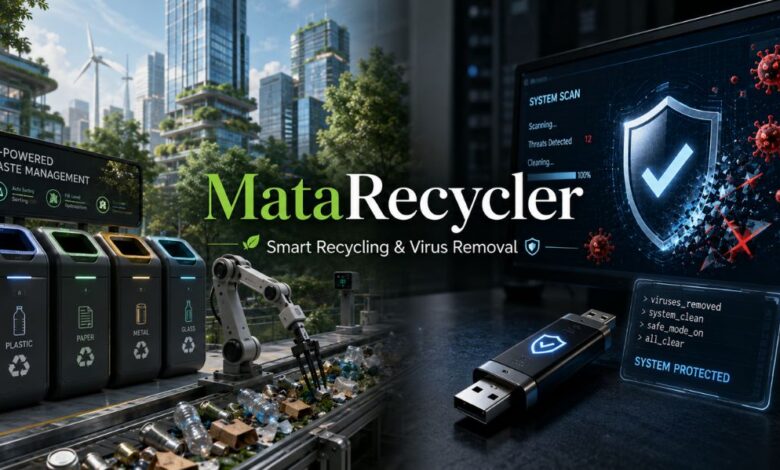
The word MataRecycler looks like the name of a single product, company, or technology, but its online history is more complicated. Depending on where the term appears, it may describe a modern concept related to artificial intelligence and smart waste management, or it may refer to an older computer security tool used to remove so-called Recycler viruses from Windows computers and USB drives. These two meanings are completely unrelated, even though they share the same spelling.
This difference matters because a search may return both automated recycling systems and old discussions about infected flash drives, shortcut files, malicious scripts, and virus-removal utilities. For that reason, the most accurate approach is to examine each meaning separately.
What Is MataRecycler?
In its modern use, MataRecycler is best understood as an emerging label for technology-assisted recycling and waste management. The term is often associated with systems that use artificial intelligence, sensors, automation, and data analysis to improve the way rubbish is identified, separated, collected, and processed. However, public information does not clearly establish MataRecycler as one universally recognised commercial platform with a confirmed manufacturer, standard product range, or independently documented specifications.
Smart recycling is a real and growing field, but the name MataRecycler is sometimes used broadly rather than to refer to a single verified machine. In practice, it can describe connected bins, cameras, weighing systems, fill-level sensors, robotic equipment, and management software working together to reduce contamination and recover more useful material.
Why the Name Creates Confusion
In environmental discussions, “recycler” suggests the recovery and reuse of materials. In older Windows terminology, “Recycler” was also associated with system folders, removable-drive infections, and malware that tried to hide inside familiar-looking locations. The Spanish word “mata” can mean “kills” or “destroys,” which helps explain why older tools intended to remove Recycler-type malware were called “Mata Recycler.”
The phrase therefore developed two separate identities: one concerned with physical waste, and another with digital threats.
MataRecycler as a Smart Waste Management Concept
The modern meaning of MataRecycler reflects a wider shift from conventional waste collection toward connected, measurable, and partly automated systems. Traditional recycling depends heavily on people placing the correct material in the correct container. When food waste, liquids, batteries, plastic film, or non-recyclable items enter the wrong stream, contamination can reduce the value of collected material and make processing more difficult.
A smart recycling model attempts to improve this process at several stages. Cameras or optical sensors may help identify an item’s material type. Fill-level sensors can report when a container is nearly full. Digital dashboards may show collection patterns across buildings or neighbourhoods. At larger facilities, automated sorting equipment can separate plastics, metals, paper, cardboard, glass, and other materials more consistently than a purely manual process.
AI-Assisted Recognition and Sorting
One of the most important features of MataRecycler is AI-powered material recognition. A camera-based system can be trained to distinguish between waste categories by analysing shape, colour, texture, labels, and other visual features. When paired with mechanical gates, air jets, or robotic arms, the system may direct items into different processing streams.
The value of this technology is not only speed. It can also generate information about the types of waste being discarded, the frequency of contamination, and the materials most often placed incorrectly. That data can support better signage, staff training, purchasing decisions, and recycling policies. AI recognition is not perfect, however. Dirty packaging, crushed objects, overlapping items, poor lighting, and unfamiliar products can reduce accuracy, so human oversight and regular maintenance remain necessary.
Sensors, Connected Bins, and Collection Data
Another important element is the use of Internet of Things sensors. A connected bin may track how full it is, how often it is opened, how much material it contains, or whether unusual conditions are present. This information can help operators avoid collecting half-empty containers and prevent bins from overflowing.
When the data is reliable, collection routes can be adjusted according to actual demand rather than a fixed timetable. That may reduce unnecessary journeys, fuel use, labour hours, and complaints. In busy locations, real-time monitoring can also show which sites need larger containers or more frequent service.
Turning Waste Data Into Better Decisions
The strongest version of the MataRecycler concept is not simply a smart bin. It is a decision-making system built around waste data. A dashboard could compare recycling rates across sites, identify recurring contamination issues, record collection volumes, and show whether a sustainability programme is improving over time.
Businesses may use this information for environmental reporting, operational planning, or cost control. Local authorities may use it to study neighbourhood waste patterns. Schools and workplaces may use it to design educational campaigns. The main advantage arises when technology makes disposal visible and measurable, rather than treating it as an unseen final step.
Benefits of the Modern MataRecycler Model
A well-designed smart recycling system can offer several practical benefits. First, it can improve material separation, thereby improving the quality of recyclable outputs. Second, it can improve operational efficiency, because collection teams can respond to actual fill levels and changing demand. Third, it can support accountability, as recorded data makes it easier to measure whether recycling targets are being met.
There is also a behavioural benefit. When users receive clear guidance or immediate feedback, they may become more aware of what belongs in each waste stream. Over time, the information gathered may help organisations reduce unnecessary packaging, replace difficult-to-recycle materials, and prevent waste before it is created.
Technology should not, however, distract from the wider waste hierarchy. Reducing consumption and reusing products are generally more valuable than relying on recycling alone. A smart system can improve the handling of discarded material, but it cannot address poor product design, excessive packaging, or a lack of suitable recycling infrastructure on its own.
Limits and Questions Surrounding MataRecycler
Because MataRecycler is not clearly documented as a standardised commercial system, claims about its exact capabilities should be treated with caution. Statements about guaranteed accuracy, dramatic cost savings, universal material recognition, or fixed environmental benefits require evidence from real installations and independent testing.
Smart bins and automated sorting systems can also be expensive to install and maintain. Cameras and sensors need cleaning, calibration, reliable power, and network connectivity. Software may require regular updates, and poor maintenance can make the data unreliable. Organisations must also consider who owns the collected information, how long it is stored, and whether camera-based equipment could capture more than the waste item itself.
The most credible way to assess any product presented under the MataRecycler name is to request clear technical documentation, named case studies, maintenance requirements, privacy safeguards, and independently verifiable results. A polished description alone does not prove that a system performs as claimed.
The Older Mata Recycler Computer Tool
Long before the term “smart-waste” became visible online, “Mata Recycler” appeared in Spanish-language computer discussions as the name of scripts or utilities promoted to remove Recycler-related malware. These threats commonly spread through USB flash drives and other removable storage. Some variants hid real folders, created misleading shortcuts, copied malicious scripts, or relied on automatic-execution behaviour in Windows.
The name made sense in that context: a “Mata Recycler” tool was intended to “kill” the Recycler virus. Yet the historical record is unclear. Different files, tutorials, scripts, and unofficial programs circulated under similar names, and they were not necessarily produced by the same developer. More importantly, at least one similarly named VBS file has been identified by security tools as malicious rather than protective.
Why Old Mata Recycler Downloads Can Be Dangerous
Downloading an old executable or script from an unknown site is risky, even when it claims to remove malware. Software written for older versions of Windows may be unsupported, altered, repackaged, or deliberately infected. A file name is not proof of safety, and a program that was once legitimate could later be distributed through an unsafe mirror.
Users should also know that Windows folders such as $Recycle.Bin or older Recycler directories are not automatically signs of infection. Windows legitimately uses recycle-bin folders on drives. Suspicion should focus on unusual executable files, unexpected scripts, shortcut replacements, repeated reinfection, security warnings, or files that appear after connecting removable media.
The Safer Modern Response to USB Malware
Anyone who suspects a USB-based infection should avoid running unknown “Mata Recycler” files found through old forums or download pages. A safer response is to disconnect affected drives, update the operating system and security software, run a complete scan of the computer, and scan each removable device before opening its contents. AutoPlay and Autorun should be restricted where appropriate, and important files should be copied only after they have been checked.
If a drive repeatedly reinfects computers, contains unexplained scripts, or keeps replacing folders with shortcuts, professional technical support may be needed. In serious cases, securely recovering verified clean files and reformatting the removable drive can be safer than relying on an unverified repair script.
How to Tell Which MataRecycler Meaning Is Intended
Context usually reveals the answer. If the discussion mentions AI, smart bins, sensors, waste collection, recycling rates, material sorting, sustainability, or circular-economy goals, it is using the modern meaning of waste management. If it mentions Windows, USB drives, VBS files, shortcuts, Autorun, hidden folders, antivirus scans, or malware removal, it is referring to the older computer-security meaning.
The date and language of the source can also help. Older Spanish-language forum posts are more likely to discuss a virus-removal utility, while recent English-language articles are more likely to describe smart recycling technology. Readers should still check whether the source provides verifiable details rather than assuming every page using the name refers to an established product.
Conclusion
MataRecycler has two distinct meanings that should never be conflated into a single story. In modern sustainability discussions, it refers to a smart waste-management approach based on artificial intelligence, connected sensors, automation, and data-led recycling. Its potential lies in improving sorting, reducing contamination, optimising collections, and giving organisations clearer information about the waste they produce. At the same time, the name is not supported by enough consistent public evidence to treat every online claim as a confirmed feature of one commercial platform.
In older computer-security discussions, Mata Recycler referred to tools or scripts associated with removing USB-spreading Recycler malware. That historical meaning carries a different warning: old security utilities and unknown scripts should not be trusted merely because they promise to remove a virus. Today, updated security software, careful handling of removable media, restricted automatic execution, and professional support provide a safer path. Understanding the context allows readers to separate an emerging recycling idea from a legacy malware-removal label and use the term MataRecycler accurately.
(FAQs)
What does the term MataRecycler actually mean?
MataRecycler has two completely different meanings. It may refer to a modern smart waste-management concept that uses artificial intelligence, sensors, and data analysis, or an older computer-security tool designed to remove Recycler-related malware from Windows computers and USB drives.
Is MataRecycler a verified commercial recycling product?
MataRecycler is not clearly documented as one universally recognised commercial product with confirmed specifications. It is more accurately described as an emerging term associated with AI-powered recycling, automated waste sorting, connected bins, and data-led waste management.
How does smart MataRecycler technology manage waste?
A smart MataRecycler system may use cameras, artificial intelligence, fill-level sensors, connected containers, and automated sorting equipment. These technologies can identify materials, reduce contamination, monitor waste volumes, improve collection routes, and help organisations make better recycling decisions.
What was the older Mata Recycler virus tool?
The older Mata Recycler name was used for scripts or executable programs that claimed to remove Recycler viruses and USB-spreading malware. These threats often hid folders, created misleading shortcuts, or copied harmful files onto removable storage devices.
Is downloading an old MataRecycler file safe?
Downloading an old MataRecycler script or executable from an unknown website is not recommended. Such files may be unsupported, modified, ineffective, or malicious. Users should instead rely on up-to-date antivirus software, complete system scans, secure USB practices, and qualified technical assistance.